PRG-1)Welcome to the world of Java! In this challenge, we practice printing to stdout.
The code stubs in your editor declare a Solution class and a main method. Complete the main method by copying the two lines of code below and pasting them inside the body of your main method.
In this challenge, we test your knowledge of using if-else conditional statements to automate decision-making processes. An if-else statement has the following logical flow:
In this challenge, you must read aninteger, adouble, and aStringfrom stdin, then print the values according to the instructions in theOutput Formatsection below. To make the problem a little easier, a portion of the code is provided for you in the editor.
On the first line, print String: followed by the unaltered String read from stdin.
On the second line, print Double: followed by the unaltered double read from stdin.
On the third line, print Int: followed by the unaltered integer read from stdin.
To make the problem easier, a portion of the code is already provided in the editor.
Note: If you use the nextLine() method immediately following the nextInt() method, recall that nextInt() reads integer tokens; because of this, the last newline character for that line of integer input is still queued in the input buffer and the next nextLine() will be reading the remainder of the integer line (which is empty).
Sample Input
42
3.1415
Welcome to HackerRank's Java tutorials!
Sample Output
String: Welcome to HackerRank's Java tutorials!
Double: 3.1415
Int: 42
Write a short program that prints each number from 1 to 100 on a new line.

For each multiple of 3, print "Fizz" instead of the number.

For each multiple of 5, print "Buzz" instead of the number.

For numbers which are multiples of both 3 and 5, print "FizzBuzz" instead of the number.
PRG-5)write a program to check given number is Perfect Number or not in Java?
A perfect number is a number that is equal to the sum of its positive divisors (excluding the number itself). For example, 6, 28, 496 etc. are perfect numbers. Because:
6 = 1+2+3
= 6
where 1, 2, and 3 are positive divisors of 6. Similarly:
28 = 1+2+4+7+14
= 28
PRG-6)write a Java program to convert days into seconds. The days must be received by user at run-time
PRG-7)Write a Java Program to Count Total Number of Digits in a Number?
PRG-8)Write a Java Program to Check Leap Year or Not.
A leap year is an year that
is divisible by 4, but not by 100
or is divisible by 400
PRG-9)write a Java program to compute simple interest based on principle, rate, and time period entered by user at run-time of the program.
PRG-10)Write program in Java that find and prints the average and percentage mark, based on the marks obtained in some number of subjects, entered by user at run-time of the program.
PRG-11)write a Java program to reverse a number. The number to reverse, must be received by user at run-time of the program.
PRG-12)To count the number of positive and negative numbers along with zero from a given set of numbers entered by user, you have to first receive some set of numbers say 10 numbers. Then check all the number usingfor loop one by one, to count the number of positive, zero, and negative number(s) available in the given set of 10 numbers and display the output on the screen
PRG-13)write a Java program to find largest between of two numbers. Both the number must be received by user at run-time of the program
Find largest of two numbers using if...else
Find largest of two numbers using conditional operator[ternary operator]
Find largest of two numbers using user-defined function
PRG-14)write a Java program to print multiplication table of any given number using for and while loops
PRG-15)write a Java program to find and print common elements available between two arrays
PRG-16)write a Java program to count even and odd numbers in an array of 10 elements
Java's System.out.printf function can be used to print formatted output. The purpose of this exercise is to test your understanding of formatting output using printf.
To get you started, a portion of the solution is provided for you in the editor; you must format and print the input to complete the solution.
Input Format
Every line of input will contain a String followed by an integer. Each String will have a maximum of alphabetic characters, and each integer will be in the inclusive range from to .
Output Format
In each line of output there should be two columns: The first column contains the String and is left justified using exactly characters. The second column contains the integer, expressed in exactly digits; if the original input has less than three digits, you must pad your output's leading digits with zeroes.
Each String is left-justified with trailing whitespace through the first characters. The leading digit of the integer is the character, and each integer that was less than digits now has leading zeroes.
In computing,End Of File(commonly abbreviatedEOF) is a condition in a computer operating system where no more data can be read from a data source." — (Wikipedia: End-of-file)
The challenge here is to read lines of input until you reach EOF, then number and print all lines of content.
Hint: Java's Scanner.hasNext() method is helpful for this problem.
Input Format
Read some unknown lines of input from stdin(System.in) until you reach EOF; each line of input contains a non-empty String.
Output Format
For each line, print the line number, followed by a single space, and then the line content received as input.
Sample Input
Hello world
I am a file
Read me until end-of-file.
Sample Output
1 Hello world
2 I am a file
3 Read me until end-of-file.
Static initialization blocks are executed when the class is loaded, and you can initialize static variables in those blocks.
It's time to test your knowledge of Static initialization blocks. You can read about it here.
You are given a class Solution with a main method. Complete the given code so that it outputs the area of a parallelogram with breadth and height . You should read the variables from the standard input.
If or , the output should be "java.lang.Exception: Breadth and height must be positive" without quotes.
Input Format
There are two lines of input. The first line contains : the breadth of the parallelogram. The next line contains : the height of the parallelogram.
Constraints
Output Format
If both values are greater than zero, then the main method must output the area of the parallelogram. Otherwise, print "java.lang.Exception: Breadth and height must be positive" without quotes.
Sample input 1
1
3
Sample output 1
3
Sample input 2
-1
2
Sample output 2
java.lang.Exception: Breadth and height must be positive
You are given an integer , you have to convert it into a string.
Please complete the partially completed code in the editor. If your code successfully converts into a string the code will print "Good job". Otherwise it will print "Wrong answer".
The Calendar class is an abstract class that provides methods for converting between a specific instant in time and a set of calendar fields such as YEAR, MONTH, DAY_OF_MONTH, HOUR, and so on, and for manipulating the calendar fields, such as getting the date of the next week.
You are given a date. You just need to write the method, getDay, which returns the day on that date. To simplify your task, we have provided a portion of the code in the editor.
Example:
month = 8
day = 14
year = 2017
The method should return MONDAY as the day on that date.
Function Description
Complete the findDay function in the editor below.
findDay has the following parameters:
int: month
int: day
int: year
Returns
string: the day of the week in capital letters
Input Format
A single line of input containing the space-separated month, day and year, respectively, in MM DD YYYY format.
Given a double-precision number, payment, denoting an amount of money, use the NumberFormat class' getCurrencyInstance method to convert the payment into the US, Indian, Chinese, and French currency formats. Then print the formatted values as follows:
"A string is traditionally a sequence of characters, either as a literal constant or as some kind of variable." — Wikipedia: String (computer science)
This exercise is to test your understanding of Java Strings. A sample String declaration:
String myString = "Hello World!"
The elements of a String are called characters. The number of characters in a string is called the length, and it can be retrieved with the String.length() method.
Given two strings of lowercase English letters, A and B, perform the following operations:
Sum the lengths of A and B.
Determine if A is lexicographically larger than B (i.e.: does B come before A in the dictionary?).
Capitalize the first letter in A and B and print them on a single line, separated by a space.
Input Format
The first line contains a string A. The second line contains another string B. The strings are comprised of only lowercase English letters.
Output Format
There are three lines of output:
For the first line, sum the lengths A of and B.
For the second line, write Yes if A is lexicographically greater than B otherwise print No instead.
For the third line, capitalize the first letter in both A and B and print them on a single line, separated by a space.
Sample Input
hello
java
Sample Output
9
No
Hello Java
Explanation
String A is "hello" and B is "java".
A has a length of 5, and B has a length of 4; the sum of their lengths is 9.
When sorted alphabetically/lexicographically, "hello" precedes "java"; therefore, A is not greater than B and the answer is No.
When you capitalize the first letter of both A and B and then print them separated by a space, you get "Hello Java".
Java has 8 primitive data types; char, boolean, byte, short, int, long, float, and double. For this exercise, we'll work with the primitives used to hold integer values (byte, short, int, and long):
A byte is an 8-bit signed integer.
A short is a 16-bit signed integer.
An int is a 32-bit signed integer.
A long is a 64-bit signed integer.
Given an input integer, you must determine which primitive data types are capable of properly storing that input.
To get you started, a portion of the solution is provided for you in the editor.
The first line contains an integer, , denoting the number of test cases. Each test case, , is comprised of a single line with an integer, , which can be arbitrarily large or small.
Output Format
For each input variable and appropriate primitive , you must determine if the given primitives are capable of storing it. If yes, then print:
n can be fitted in:
* dataType
If there is more than one appropriate data type, print each one on its own line and order them by size (i.e.: ).
If the number cannot be stored in one of the four aforementioned primitives, print the line:
-150 can be fitted in:
* short
* int
* long
150000 can be fitted in:
* int
* long
1500000000 can be fitted in:
* int
* long
213333333333333333333333333333333333 can't be fitted anywhere.
-100000000000000 can be fitted in:
* long
Explanation
can be stored in a short, an int, or a long.
is very large and is outside of the allowable range of values for the primitive data types discussed in this problem.
System.out.println(sc.next()+" can't be fitted anywhere.");
}
}
}
}
================================================
PRG-27
Two strings, and , are called anagrams if they contain all the same characters in the same frequencies. For this challenge, the test is not case-sensitive. For example, the anagrams of CAT are CAT, ACT, tac, TCA, aTC, and CtA.
Function Description
Complete the isAnagram function in the editor.
isAnagram has the following parameters:
string a: the first string
string b: the second string
Returns
boolean: If and are case-insensitive anagrams, return true. Otherwise, return false.
Input Format
The first line contains a string . The second line contains a string .
Constraints
Strings and consist of English alphabetic characters.
The comparison should NOT be case sensitive.
Sample Input 0
anagrammargana
Sample Output 0
Anagrams
Explanation 0
Character
Frequency: anagram
Frequency: margana
A or a
3
3
G or g
1
1
N or n
1
1
M or m
1
1
R or r
1
1
The two strings contain all the same letters in the same frequencies, so we print "Anagrams".
Sample Input 1
anagrammmarganaa
Sample Output 1
Not Anagrams
Explanation 1
Character
Frequency: anagramm
Frequency: marganaa
A or a
3
4
G or g
1
1
N or n
1
1
M or m
2
1
R or r
1
1
The two strings don't contain the same number of a's and m's, so we print "Not Anagrams".
Sample Input 2
Hellohello
Sample Output 2
Anagrams
Explanation 2
Character
Frequency: Hello
Frequency: hello
E or e
1
1
H or h
1
1
L or l
2
2
O or o
1
1
The two strings contain all the same letters in the same frequencies, so we print "Anagrams".
This means that a Bird object has all the properties that an Animal object has, as well as some additional unique properties.
The code above is provided for you in your editor. You must add a sing method to the Bird class, then modify the main method accordingly so that the code prints the following lines:
A class named Arithmetic with a method named add that takes integers as parameters and returns an integer denoting their sum.
A class named Adder that inherits from a superclass named Arithmetic.
Your classes should not be be .
Input Format
You are not responsible for reading any input from stdin; a locked code stub will test your submission by calling the add method on an Adder object and passing it integer parameters
Output Format
You are not responsible for printing anything to stdout. Your add method must return the sum of its parameters.
Sample Output
The main method in the Solution class above should print the following:
Create a program using maths and f-Strings that tells us how many days, weeks, months we have left if we live until 90 years old.
It will take your current age as the input and output a message with our time left in this format:
You have x days, y weeks, and z months left.
Where x, y and z are replaced with the actual calculated numbers.
Warning your output should match the Example Output format exactly, even the positions of the commas and full stops.
Hint
There are 365 days in a year, 52 weeks in a year and 12 months in a yea
Example Input
56
Example Output
You have 12410 days, 1768 weeks, and 408 months left.
PRG-32
Exercise 32 - BMI Calculator
Instructions
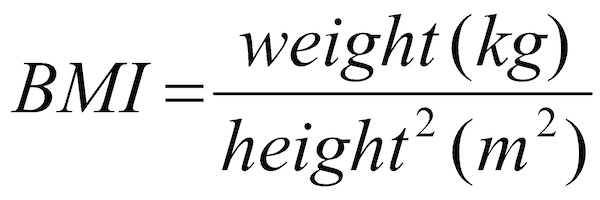
Write a program that calculates the Body Mass Index (BMI) from a user's weight and height.
The BMI is a measure of someone's weight taking into account their height. e.g. If a tall person and a short person both weigh the same amount, the short person is usually more overweight.
The BMI is calculated by dividing a person's weight (in kg) by the square of their height (in m):
Warning you should convert the result to a whole number.
Hint
Check the data type of the inputs.
Try to use the exponent operator in your code.
Remember PEMDAS.
Remember to convert your result to a whole number (int).